We will demonstrate with this example:
library(tidyverse)
library(dslabs)
path <- system.file("extdata", package="dslabs")
filename <- file.path(path,  "fertility-two-countries-example.csv")
wide_data <- read_csv(filename)
3/13/2019
We will demonstrate with this example:
library(tidyverse)
library(dslabs)
path <- system.file("extdata", package="dslabs")
filename <- file.path(path, "fertility-two-countries-example.csv")
wide_data <- read_csv(filename)
gathernew_tidy_data <- wide_data %>% gather(year, fertility, `1960`:`2015`)
gatherWe can see that the data have been converted to tidy format with columns year and fertility:
head(new_tidy_data)
## # A tibble: 6 x 3
##   country     year  fertility
##   <chr>       <chr>     <dbl>
## 1 Germany     1960       2.41
## 2 South Korea 1960       6.16
## 3 Germany     1961       2.44
## 4 South Korea 1961       5.99
## 5 Germany     1962       2.47
## 6 South Korea 1962       5.79
gatherA somewhat quicker way to write this code is to specify which column will not be gathered:
new_tidy_data <- wide_data %>%
  gather(year, fertility, -country)
gatherThe new_tidy_data object looks like the original tidy_data we showed in a previous lecture:
data("gapminder")
tidy_data <- gapminder %>%
  filter(country %in% c("South Korea", "Germany") &
           !is.na(fertility)) %>%
  select(country, year, fertility)
gatherWith just one minor difference. Can you spot it?
class(tidy_data$year)
## [1] "integer"
class(new_tidy_data$year)
## [1] "character"
gatherWe can use the convert function:
new_tidy_data <- wide_data %>%
  gather(year, fertility, -country, convert = TRUE)
class(new_tidy_data$year)
## [1] "integer"
tidy makes ggplot2 easier to usenew_tidy_data %>% ggplot(aes(year, fertility, color = country)) + geom_point()

spreadnew_wide_data <- new_tidy_data %>% spread(year, fertility) select(new_wide_data, country, `1960`:`1967`)
## # A tibble: 2 x 9
##   country     `1960` `1961` `1962` `1963` `1964` `1965` `1966` `1967`
##   <chr>        <dbl>  <dbl>  <dbl>  <dbl>  <dbl>  <dbl>  <dbl>  <dbl>
## 1 Germany       2.41   2.44   2.47   2.49   2.49   2.48   2.44   2.37
## 2 South Korea   6.16   5.99   5.79   5.57   5.36   5.16   4.99   4.85
gather and spread
(Source: RStudio)
We want to combine this table
data(murders)
head(murders)
##        state abb region population total
## 1    Alabama  AL  South    4779736   135
## 2     Alaska  AK   West     710231    19
## 3    Arizona  AZ   West    6392017   232
## 4   Arkansas  AR  South    2915918    93
## 5 California  CA   West   37253956  1257
## 6   Colorado  CO   West    5029196    65
With this table
data(polls_us_election_2016)
head(results_us_election_2016)
##          state electoral_votes clinton trump others
## 1   California              55    61.7  31.6    6.7
## 2        Texas              38    43.2  52.2    4.5
## 3      Florida              29    47.8  49.0    3.2
## 4     New York              29    59.0  36.5    4.5
## 5     Illinois              20    55.8  38.8    5.4
## 6 Pennsylvania              20    47.9  48.6    3.6
identical(results_us_election_2016$state, murders$state)
## [1] FALSE
Similar to SQL:
tab <- left_join(murders, results_us_election_2016, by = "state") %>% select(-others)
head(tab)
##        state abb region population total electoral_votes clinton trump
## 1    Alabama  AL  South    4779736   135               9    34.4  62.1
## 2     Alaska  AK   West     710231    19               3    36.6  51.3
## 3    Arizona  AZ   West    6392017   232              11    45.1  48.7
## 4   Arkansas  AR  South    2915918    93               6    33.7  60.6
## 5 California  CA   West   37253956  1257              55    61.7  31.6
## 6   Colorado  CO   West    5029196    65               9    48.2  43.3
library(ggrepel)
tab %>% ggplot(aes(population/10^6, electoral_votes, label = abb)) +
  geom_point() +
  geom_text_repel() +
  scale_x_continuous(trans = "log2") +
  scale_y_continuous(trans = "log2") +
  geom_smooth(method = "lm", se = FALSE)

tab_1 <- slice(murders, 1:6) %>% select(state, population)
tab_1
##        state population
## 1    Alabama    4779736
## 2     Alaska     710231
## 3    Arizona    6392017
## 4   Arkansas    2915918
## 5 California   37253956
## 6   Colorado    5029196
tab_2 <- results_us_election_2016 %>%
  filter(state%in%c("Alabama", "Alaska", "Arizona",
                    "California", "Connecticut","Delaware")) %>%
  select(state, electoral_votes)
tab_2
##         state electoral_votes
## 1  California              55
## 2     Arizona              11
## 3     Alabama               9
## 4 Connecticut               7
## 5      Alaska               3
## 6    Delaware               3
left_join(tab_1, tab_2, by = "state")
##        state population electoral_votes
## 1    Alabama    4779736               9
## 2     Alaska     710231               3
## 3    Arizona    6392017              11
## 4   Arkansas    2915918              NA
## 5 California   37253956              55
## 6   Colorado    5029196              NA
tab_1 %>% left_join(tab_2, by = "state")
tab_1 %>% right_join(tab_2, by = "state")
##         state population electoral_votes
## 1  California   37253956              55
## 2     Arizona    6392017              11
## 3     Alabama    4779736               9
## 4 Connecticut         NA               7
## 5      Alaska     710231               3
## 6    Delaware         NA               3
inner_join(tab_1, tab_2, by = "state")
##        state population electoral_votes
## 1    Alabama    4779736               9
## 2     Alaska     710231               3
## 3    Arizona    6392017              11
## 4 California   37253956              55
full_join(tab_1, tab_2, by = "state")
##         state population electoral_votes
## 1     Alabama    4779736               9
## 2      Alaska     710231               3
## 3     Arizona    6392017              11
## 4    Arkansas    2915918              NA
## 5  California   37253956              55
## 6    Colorado    5029196              NA
## 7 Connecticut         NA               7
## 8    Delaware         NA               3
semi_join(tab_1, tab_2, by = "state")
##        state population
## 1    Alabama    4779736
## 2     Alaska     710231
## 3    Arizona    6392017
## 4 California   37253956
anti_join(tab_1, tab_2, by = "state")
##      state population
## 1 Arkansas    2915918
## 2 Colorado    5029196
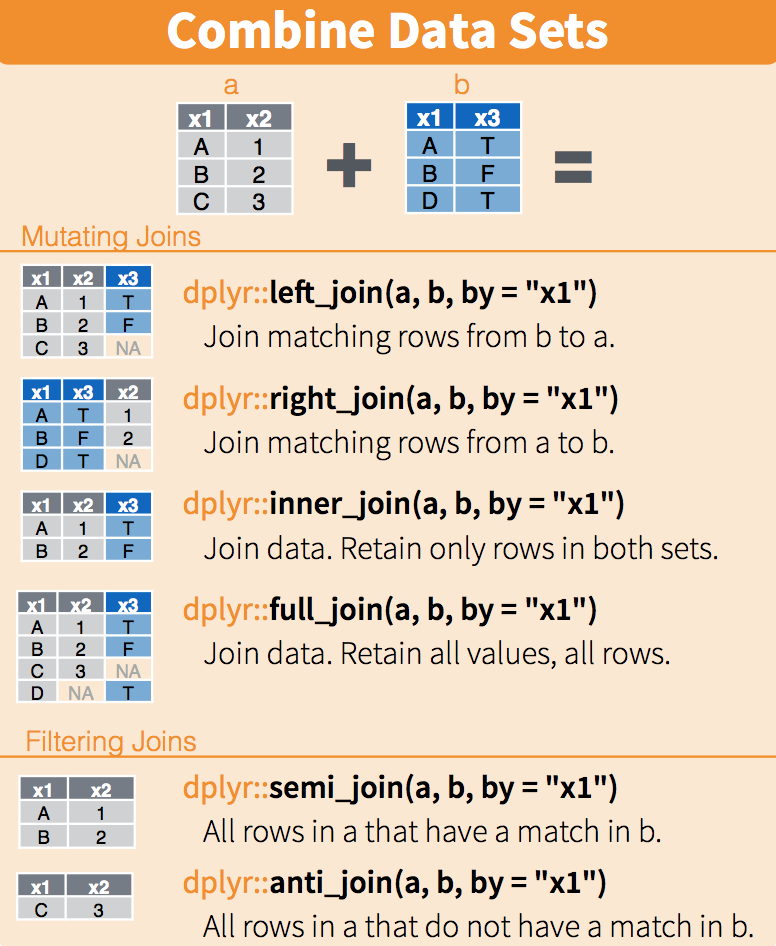
(Source: RStudio)
Tidyverse offers versions for tables of operators such as:
intersectunionsetdiffsetequal.tab_1 <- tab[1:5,] tab_2 <- tab[3:7,] dplyr::intersect(tab_1, tab_2)
##        state abb region population total electoral_votes clinton trump
## 1    Arizona  AZ   West    6392017   232              11    45.1  48.7
## 2   Arkansas  AR  South    2915918    93               6    33.7  60.6
## 3 California  CA   West   37253956  1257              55    61.7  31.6
tab_1 <- tab[1:5,]
tab_2 <- tab[3:7,]
dplyr::union(tab_1, tab_2)
##         state abb    region population total electoral_votes clinton trump
## 1 Connecticut  CT Northeast    3574097    97               7    54.6  40.9
## 2    Colorado  CO      West    5029196    65               9    48.2  43.3
## 3  California  CA      West   37253956  1257              55    61.7  31.6
## 4    Arkansas  AR     South    2915918    93               6    33.7  60.6
## 5     Arizona  AZ      West    6392017   232              11    45.1  48.7
## 6      Alaska  AK      West     710231    19               3    36.6  51.3
## 7     Alabama  AL     South    4779736   135               9    34.4  62.1
setdifftab_1 <- tab[1:5,] tab_2 <- tab[3:7,] dplyr::setdiff(tab_1, tab_2)
##     state abb region population total electoral_votes clinton trump
## 1 Alabama  AL  South    4779736   135               9    34.4  62.1
## 2  Alaska  AK   West     710231    19               3    36.6  51.3
setequaldplyr::setequal(tab_1, tab_2)
## FALSE: Rows in x but not y: 2, 1. Rows in y but not x: 5, 4.